Ubuntu
24.04 or newer
A .deb package with its Swift runtime bundled.
Linux · Terminal edition
Secrets, environments, approvals, and task sessions for Linux. Stored locally with pass and GPG, and set up with a single command.
24.04 or newer
A .deb package with its Swift runtime bundled.
Signed pacman repository
Add the repository once; pacman -Syu keeps Enveigh current.
Uses the Arch repository
Tested in a real Omarchy session with Hyprland, lock and relogin.
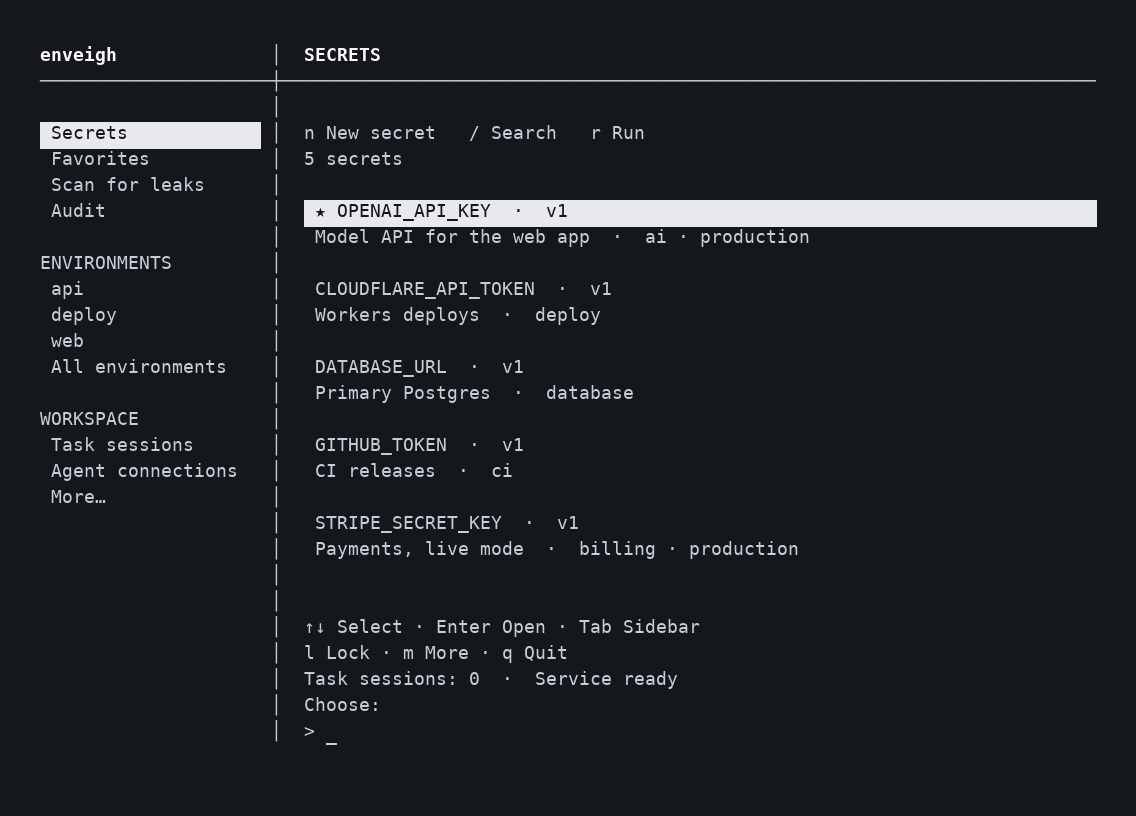
The terminal UI. Values never appear in the list.
Pick your system. Every download is checksummed, and the Arch repository is signed.
Choose your CPU. Not sure? Run uname -m: x86_64 or aarch64.
curl -fsSLO https://enveigh.com/linux/downloads/enveigh_0.2.11~linux.7_amd64.deb curl -fsSLO https://enveigh.com/linux/downloads/SHA256SUMS sha256sum --ignore-missing -c SHA256SUMS sudo apt install ./enveigh_0.2.11~linux.7_amd64.deb
curl -fsSLO https://enveigh.com/linux/downloads/enveigh_0.2.11~linux.7_arm64.deb curl -fsSLO https://enveigh.com/linux/downloads/SHA256SUMS sha256sum --ignore-missing -c SHA256SUMS sudo apt install ./enveigh_0.2.11~linux.7_arm64.deb
That is the whole setup. See what happens below.
enveigh
Import the key, check its fingerprint, then sign it locally.
0CC6 120F 14A3 DE01 4FC8 C3AD 7B34 D87A 7988 4ACBcurl -fsSLO https://enveigh.com/linux/arch/enveigh-packages.asc sudo pacman-key --add enveigh-packages.asc sudo pacman-key --finger 0CC6120F14A3DE014FC8C3AD7B34D87A79884ACB sudo pacman-key --lsign-key 0CC6120F14A3DE014FC8C3AD7B34D87A79884ACB
Signatures are required for the packages and the database.
sudo tee -a /etc/pacman.conf <<'EOF' [enveigh] SigLevel = Required DatabaseRequired Server = https://enveigh.com/linux/arch/$arch EOF
sudo pacman -Sy enveigh enveigh
sudo pacman -Syu installs new releases. Works on x86_64 and ARM64.Use your distribution's packages: glibc 2.39 or newer, OpenSSL 3, pass, GnuPG, pinentry and Git.
curl -fsSLO https://enveigh.com/linux/downloads/enveigh_0.2.11~linux.7_amd64.tar.gz curl -fsSLO https://enveigh.com/linux/downloads/SHA256SUMS sha256sum --ignore-missing -c SHA256SUMS sudo tar -xzf enveigh_0.2.11~linux.7_amd64.tar.gz -C /
curl -fsSLO https://enveigh.com/linux/downloads/enveigh_0.2.11~linux.7_arm64.tar.gz curl -fsSLO https://enveigh.com/linux/downloads/SHA256SUMS sha256sum --ignore-missing -c SHA256SUMS sudo tar -xzf enveigh_0.2.11~linux.7_arm64.tar.gz -C /
Files go to /usr/lib/enveigh, /usr/bin/enveigh and a systemd user unit.
enveigh
The first time you run enveigh as your normal user, it does the setup for you:
Approve a finite task session before a long build or agent run. Rebuilds and reconnects reuse its approved credentials without reopening GPG when the passphrase cache expires.
enveigh session start --env web --hours 12 enveigh run --env web --session SESSION_ID -- npm run build enveigh session end SESSION_ID
Screen lock and closing the TUI keep an approved session. Expiry, vault lock, revocation, or stopping the service end future access. Running processes keep credentials they already received.
Secrets and version history, favorites, environments, imports, scan review, audit, encrypted backups, agent connections, task sessions, service controls, settings, and clipboard capture. The native desktop edition is still planned; this download is the terminal edition.
Finish active runs first: restarting the service ends task sessions. On Arch, run sudo pacman -Syu; on Ubuntu, install the new .deb. Then run systemctl --user restart enveigh and enveigh to unlock again. Connected agents keep their connections.
The agent's MCP entry was not created by Enveigh, for example one added with claude mcp add. Run enveigh, open Agent connections and choose that client. Enveigh replaces the entry with a scoped token, including project-scoped Claude Code entries. Restart the agent afterward.
Each package has a SHA-256 in SHA256SUMS. Checksums confirm the file is intact; the Arch repository adds signatures from the key above. Manual archives: x86_64 · ARM64 · PKGBUILD.