Linux
The terminal edition: install on Ubuntu, Arch or Omarchy, set up with one command, and connect your agents.
enveigh runs on Linux as a terminal edition: the same vault model, environments, agent connections and task sessions as the Mac app, driven from a keyboard-first TUI. Values are stored with pass and GPG instead of the macOS Keychain, and approvals happen in the TUI instead of Touch ID.
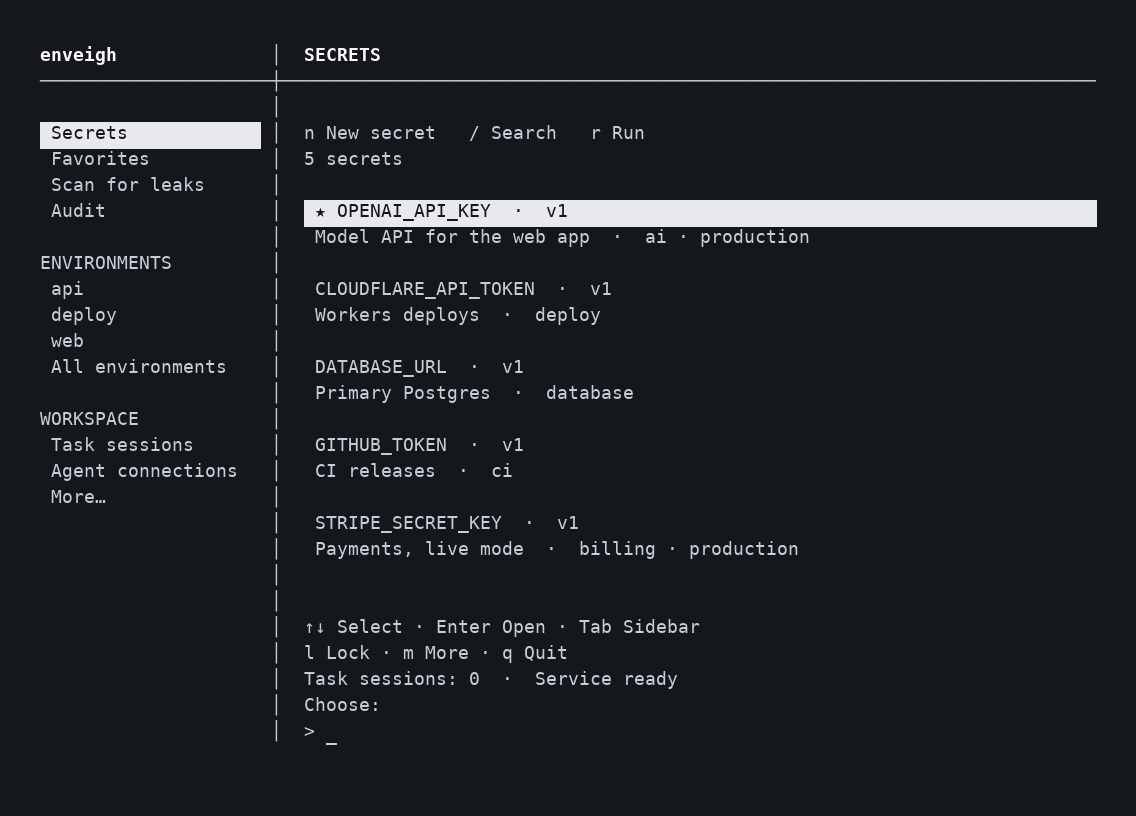
Current release: 0.2.11 · Linux build 7, for x86_64 and ARM64. Downloads and a step-by-step installer are on enveigh.com/linux.
Install
Ubuntu 24.04 or newer
curl -fsSLO https://enveigh.com/linux/downloads/enveigh_0.2.11~linux.7_amd64.deb
curl -fsSLO https://enveigh.com/linux/downloads/SHA256SUMS
sha256sum --ignore-missing -c SHA256SUMS
sudo apt install ./enveigh_0.2.11~linux.7_amd64.deb
On ARM64, use _arm64.deb. Check your CPU with uname -m.
Arch Linux and Omarchy: signed pacman repository
Add the repository once, and sudo pacman -Syu keeps enveigh current. Packages and the
repository database are signed; pacman refuses anything unsigned or modified.
curl -fsSLO https://enveigh.com/linux/arch/enveigh-packages.asc
sudo pacman-key --add enveigh-packages.asc
sudo pacman-key --finger 0CC6120F14A3DE014FC8C3AD7B34D87A79884ACB
sudo pacman-key --lsign-key 0CC6120F14A3DE014FC8C3AD7B34D87A79884ACB
sudo tee -a /etc/pacman.conf <<'EOF'
[enveigh]
SigLevel = Required DatabaseRequired
Server = https://enveigh.com/linux/arch/$arch
EOF
sudo pacman -Sy enveigh
Check that the fingerprint pacman-key --finger prints is
0CC6 120F 14A3 DE01 4FC8 C3AD 7B34 D87A 7988 4ACB before you sign the key.
Other distributions
Install glibc 2.39 or newer, OpenSSL 3, pass, GnuPG, pinentry and Git, then unpack the
runtime archive (_amd64.tar.gz or _arm64.tar.gz) from the download page into /.
It installs /usr/lib/enveigh, /usr/bin/enveigh and a systemd user unit.
First run: one command
Run enveigh as your normal user, never root:
enveighThe first run does the setup for you:
- GPG key. It uses your GPG encryption key, lets you choose if you have several, or creates a passphrase-protected key if you have none. Back up the key and its revocation certificate separately.
- Service. It starts the
enveighsystemd user service and turns on start at login. Without systemd it startsenveigh servein the background (log:~/.local/share/enveigh/service.log). - Unlock. Pinentry asks for your passphrase. enveigh never receives it; your key decrypts a short-lived challenge instead.
Later runs go straight to your vault. Unlocking is the only permission step: changes you
make in the TUI save without extra prompts. Destructive actions (delete, restore, purge,
rotate, lock, stop) ask once for y. Agents, the CLI and other programs still need
approval under your approval policy.
enveigh tui, enveigh setup [fingerprint], enveigh serve, enveigh unlock and
enveigh lock remain available for scripted or manual setups.
Using the TUI
The sidebar follows the Mac app: Secrets, Favorites, Scan for leaks, Audit, your environments, and workspace tools.
| Key | Action |
|---|---|
↑ ↓ · Enter · Tab | Select · open · move between list and sidebar |
n · / · f | New secret · search · favorites |
e | Environments (bind secrets, run commands, write dotenv files) |
3 · 4 | Task sessions · agent connections |
m | More: backups, audit, scan, vault health, commands, service, settings |
t · s · c | Settings · service & startup · capture from clipboard |
l · q | Lock the vault · quit (the service keeps running) |
Esc / Ctrl-C | Back |
Successful changes show a ✓ notice on the next screen. Forms keep what you typed if an
agent request needs a decision in the middle: press y to allow, Enter to deny.
Connect your agents
Open Agent connections (4), choose a client (Claude Code, Codex, Cursor, Windsurf,
Gemini CLI, Antigravity), pick the environment it may use from the list, and answer two
questions: may it read raw values, and should its own tool prompts be pre-approved.
enveigh mints a revocable token for that client and writes its MCP entry. Restart the
client afterward.
If an agent reports no enveigh client token (ENVEIGH_MCP_TOKEN), its MCP entry was
not created by enveigh, for example one added with claude mcp add. Choose that client
in Agent connections: enveigh replaces the entry, including project-scoped Claude Code
entries that would override it.
The MCP server and CLI work the same way as on the Mac.
Long runs: task sessions
Approve a finite task session before a long build or agent run. The session caches that environment's values in the service's memory, so rebuilds and reconnects keep working when GPG's passphrase cache expires.
enveigh session start --env web --hours 12
enveigh run --env web --session SESSION_ID -- npm run build
enveigh session end SESSION_ID
Screen lock and closing the TUI keep a session. Expiry, locking the vault, ending the session, or stopping the service end future access. Running processes keep values they already received.
Security model
- Values are encrypted with your GPG key in a dedicated password store under
~/.local/share/enveigh/password-store. Metadata, audit events and backups use the same encrypted vault format as the Mac app. There is no plaintext fallback. - The service runs GPG with
--batch --pinentry-mode error, so it never opens pinentry by itself. Only a person at a terminal can unlock. - GPG's own cache policy applies. Unlocking with a cached passphrase is not a fresh biometric check like Touch ID.
- The TUI skips a second approval only for requests from the
enveigh tuiprocess itself, identified by the kernel-reported socket peer, and only after it completes the GPG unlock step. The same session token used from any other process still needs approval. - The service seals the approval policy with your GPG key, in the enveigh password store.
It is not a
settings.jsonfield, and the service ignores any policy written there. If the saved policy is missing or damaged, the service asks for approval on every request. - Approving a request needs proof that you are present. Unlock with your GPG key in the TUI first. Until you do, a TUI opened on an already unlocked service gets the same approval prompts as any other program. Choosing a policy that asks less often also needs this step.
- Skills and MCP instructions tell agents not to extract secrets or bypass denials. They are behavioral safeguards, not isolation from arbitrary code running as your user.
Upgrading
Finish active runs first: restarting the service ends task sessions. Build 7 (0.2.11~linux.7)
fixed security problems, so update if you run an earlier build. See
Updates.
sudo pacman -Syu                    # Arch and Omarchy
sudo apt install ./enveigh_<version>_amd64.deb   # Ubuntu
systemctl --user restart enveigh
enveigh
Connected agents keep their connections. Package installation never starts the service, connects agents or changes GPG settings by itself.
Troubleshooting
- Service unavailable. Run
enveigh: it starts the service. Otherwise checksystemctl --user status enveigh, or runenveigh servein another terminal to see errors. - Custom
GNUPGHOMEorXDG_DATA_HOME. Set the same values in the service's systemd override and in your shell. - Pinentry does not appear. Install
pinentry(curses or GTK) and checkgpg-agent.conf. In SSH sessions, run enveigh in an interactive terminal. - Clipboard capture. Wayland needs
wl-clipboard; X11 needsxclip.